

How it works
HomeThoughts is a thoughtful place to save notes, photos, and voice memos while touring homes and neighborhoods. It follows the natural rhythm of a home search: you see homes, you feel things, and eventually you have to choose. Nothing you noticed gets lost between the first tour and the final decision.
Step one
Capture while it's fresh
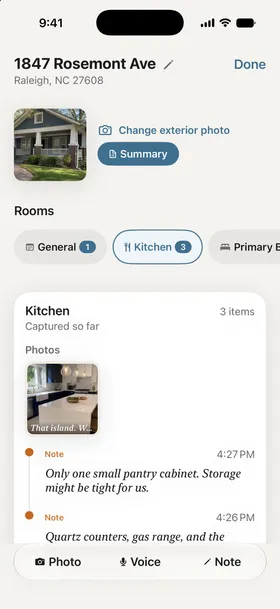
At the tour, on the street outside, or in the car right after: snap photos, talk out a voice memo, or tap a quick thought into the app. Capture a home, or a whole neighborhood on an evening walk.
Start by scanning the agent's listing sheet: HomeThoughts reads it on your iPhone and fills in the price, address, beds, baths, square footage, taxes, and year built, so you never type them. Add a quick caption to a photo and it feeds the report later.
Voice memos are transcribed on your iPhone as you speak, so your words are searchable text by the time you're back in the car. The audio never leaves your phone. Hands full? Siri and the Action button capture without opening the app.
"Open layout, great natural light from the south-facing windows."
Step two
Reports in your own words
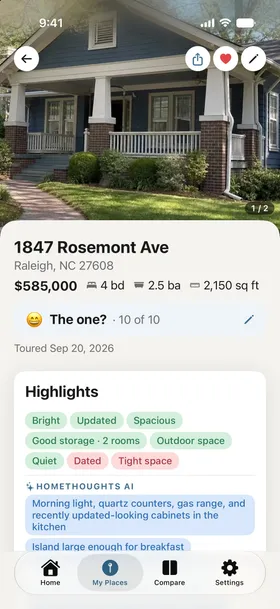
When you're ready, HomeThoughts turns a home's captures into a summary: your first impression on a scale of 1 to 10, the highlights, what to look into, and your own words quoted back to you. Neighborhoods get a summary of their own, from coffee walkability to how quiet the street really was.
HomeThoughts also turns what you noticed into real questions your agent can answer, about things like disclosures, repair history, or HOA rules, plus a list of things to look for on your next visit. Send the questions in a text, or share a summary as a link your family can open. When one home clearly leads, one tap tells your agent you've decided, so "here's where my head is" stops taking a Sunday afternoon.
Step three
See where you stand
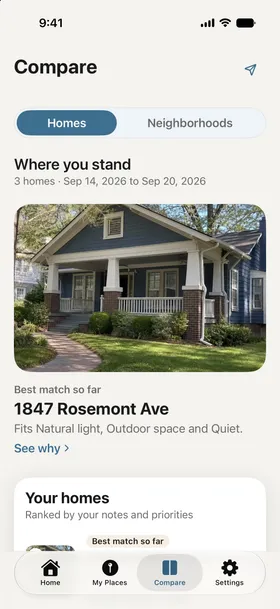
The Compare tab starts with your best match so far: the home that fits you best on your own notes and the priorities you set, with the reasons it leads and what could change it. Below it, every home you've toured is ranked the same way. And if you're searching with someone, it shows where the two of you read a home differently.
Open Side by side and the facts sit right beside the feelings: price and the home's details, your scores, drive times, and how each home did on what you said matters, in one table. And when a home isn't the one, rule it out with a quick note about why you passed; it drops out of the comparison but keeps its record.
It's a lean, not a verdict. When one home fits best on your notes, HomeThoughts says so and says why. When your notes are thin, it tells you it's early. It will never tell you to buy a home. That part was always yours.
And when the search ends
When you've made your decision, HomeThoughts wraps the whole journey into a Search Recap: the homes, the walks, the things you said, the moment it clicked. A keepsake of the search that got you home, not just the address that ended it. Your home, your story.

Questions, answered
- Does my partner need the app too?
- No. HomeThoughts works fully on its own. Searching with someone? Link accounts and you share one workspace: everyone’s captures land in the same place, reports weave both voices together, and one Full Access purchase covers you both.
- What if only one of us makes it to a tour?
- Capture anyway. Photos, a voice memo in the car after, whatever you can grab. Your partner sees everything in the shared workspace, and the report gives you both the same starting point for the dinner-table conversation.
- How long does a report take?
- Moments. Once you tap for a report, HomeThoughts organizes your captures into the summary, pulls out what you said, and flags what stood out. Reports are free for every home and neighborhood you tour, and your first few AI-written summaries are free too.
Thoughtful notes. Better decisions. A home you'll love.
Free to download. Reports are free for every home you tour.

 Point your iPhone camera here